Did you pay through a payment request with buyer protection and is something wrong? The item has not arrived, differs from the description or is damaged? Then you and the seller sort this out together in the chat, using the dispute function. Below we explain step by step how it works.
In short
- A dispute can only be started by the buyer, as long as the money is still held by Airsoft Bazaar (so before the automatic release).
- As soon as a dispute is open, the payout to the seller is paused.
- The buyer proposes a (partial) refund. The seller accepts it, or rejects it and makes a counter proposal.
- As soon as a proposal is accepted, that amount is refunded to the buyer immediately and the remainder is released to the seller immediately.
- Airsoft Bazaar does not mediate on the content of a dispute: buyer and seller decide on the solution together. If the other party stops responding altogether, you can involve support.
Step 1: talk it through in the chat first
A dispute is not a complaint to Airsoft Bazaar, but a way to record and execute an agreement together. So discuss the problem in the chat first. Share photos or a video of the item and say what you consider a fair solution, for example a partial refund for repair costs or a full refund if the parcel never arrived. You will often reach an agreement this way, and can then wrap it up with a single proposal.
Step 2: open the purchase overview
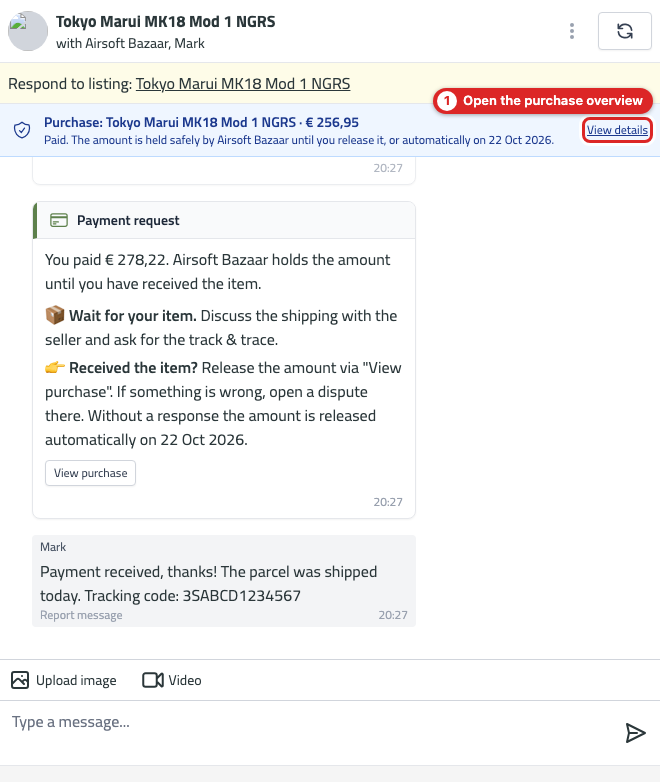
At the top of the chat you see the Purchase bar with the status of the payment. Click View details (or the View purchase button below the payment request in the chat) to open the purchase overview.
The purchase overview shows the amounts, the timeline and the date on which the amount is released automatically. As a buyer you see two buttons here: I have received the item (the amount is released to the seller immediately) and Start dispute.
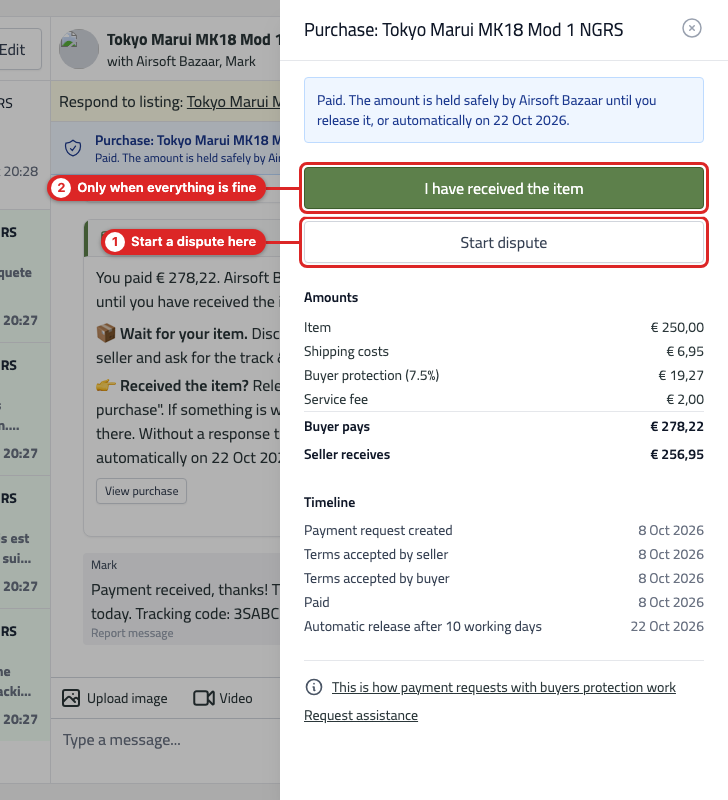
Please note: only click "I have received the item" when the item has arrived and is in order. This step cannot be undone.
Step 3: start the dispute (buyer)
Click Start dispute. You fill in two things:
- What is wrong? Describe the problem briefly and concretely. The seller will see this text.
- Proposed refund: the amount you want back. This can be at most the amount the seller receives (item price plus shipping costs). If you propose the full amount, you get everything back except the buyer protection and the service fee.
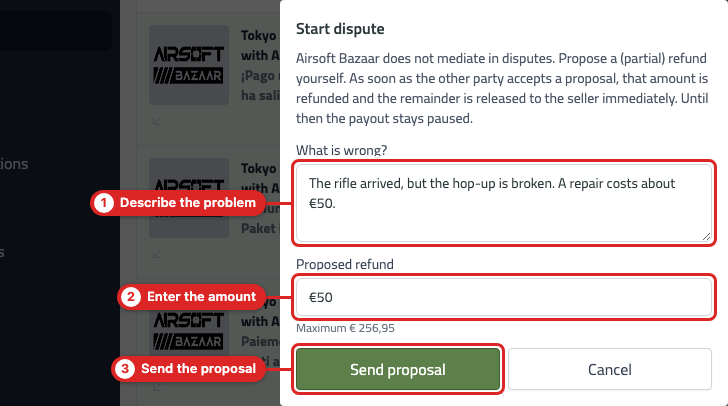
Click Send proposal. From that moment the payout is paused and a dispute card appears in the chat. The seller is notified automatically.
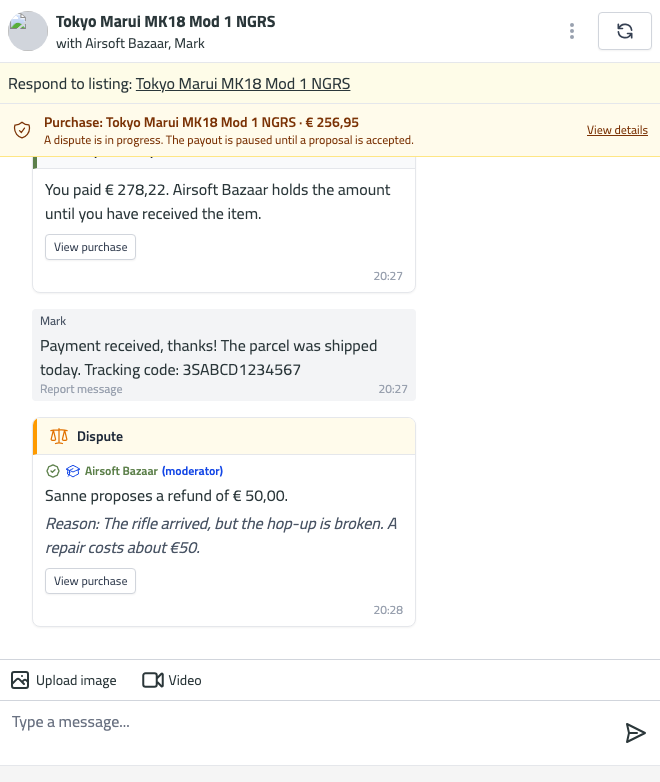
Step 4: the seller responds
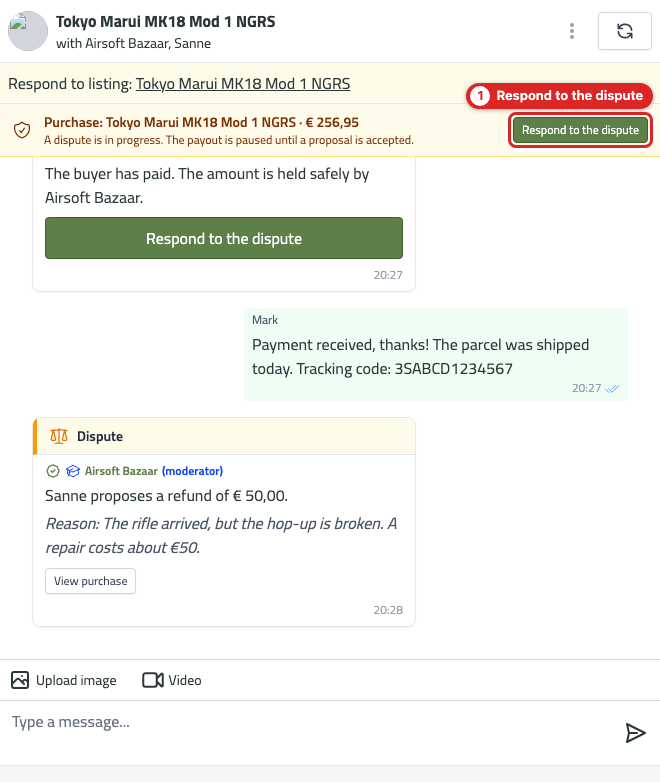
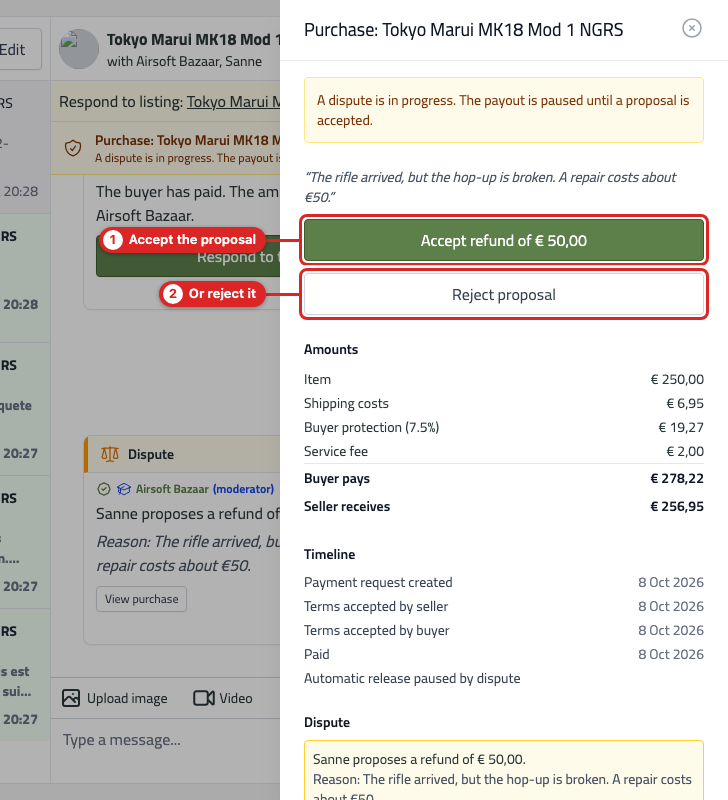
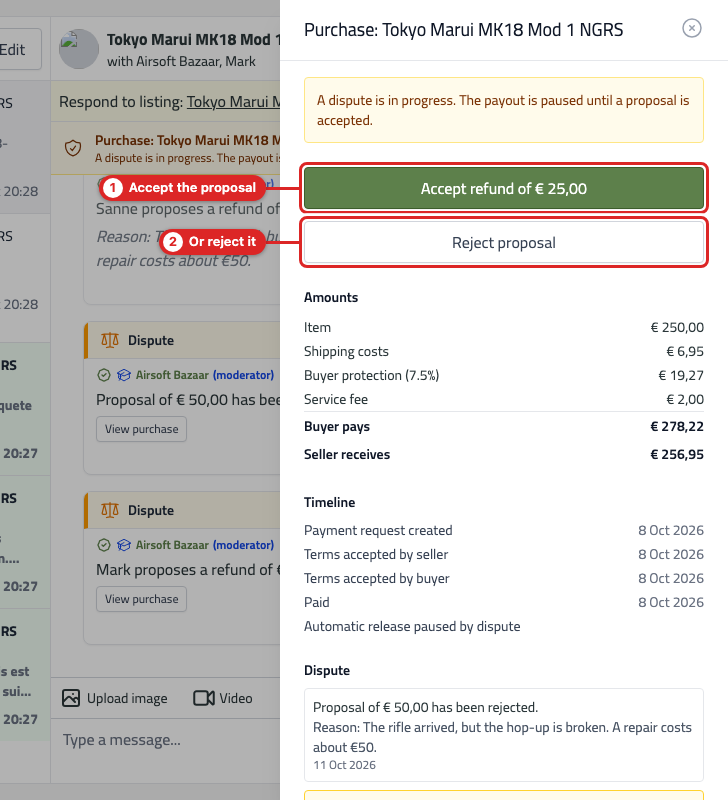
The seller sees the Respond to the dispute button in the chat. The purchase overview shows the buyer's reason and the proposed amount, with two options:
- Accept refund of € …: the amount is refunded to the buyer immediately and the remainder is released to the seller immediately. This closes the dispute.
- Reject proposal: the payout stays paused. Both parties can then make a counter proposal.
Accepting is final: the refund is executed immediately and cannot be reversed.
Step 5: rejected? Make a counter proposal
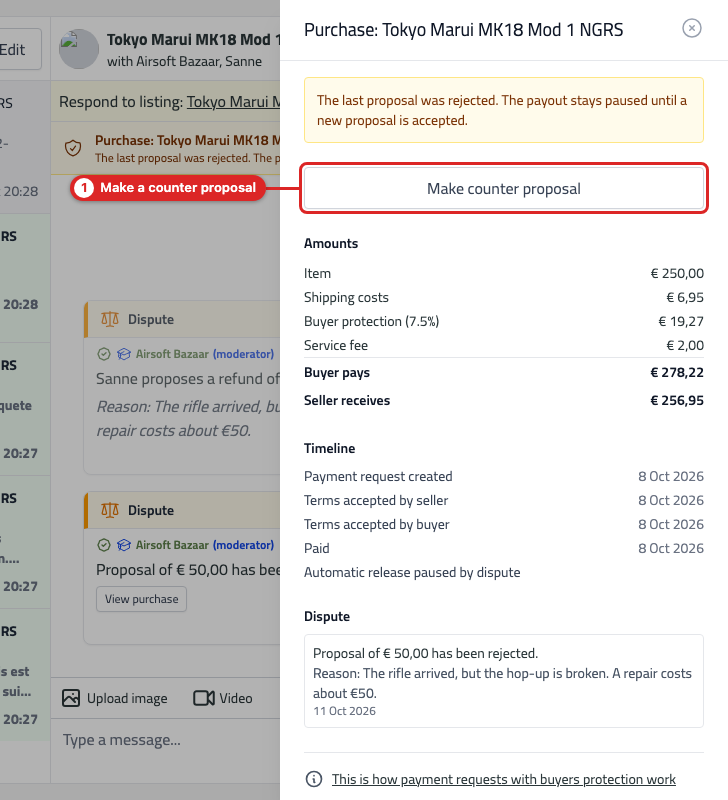
If a proposal has been rejected, both the buyer and the seller can make a counter proposal with a different amount. Discuss in the chat which amount you both find reasonable and record it with a counter proposal. The other party can accept or reject it again. You can repeat this until you agree.
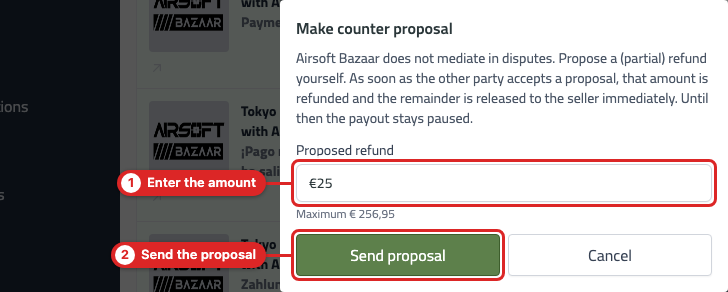
The buyer then sees the seller's counter proposal in the purchase overview and can accept or reject it.
Step 6: proposal accepted
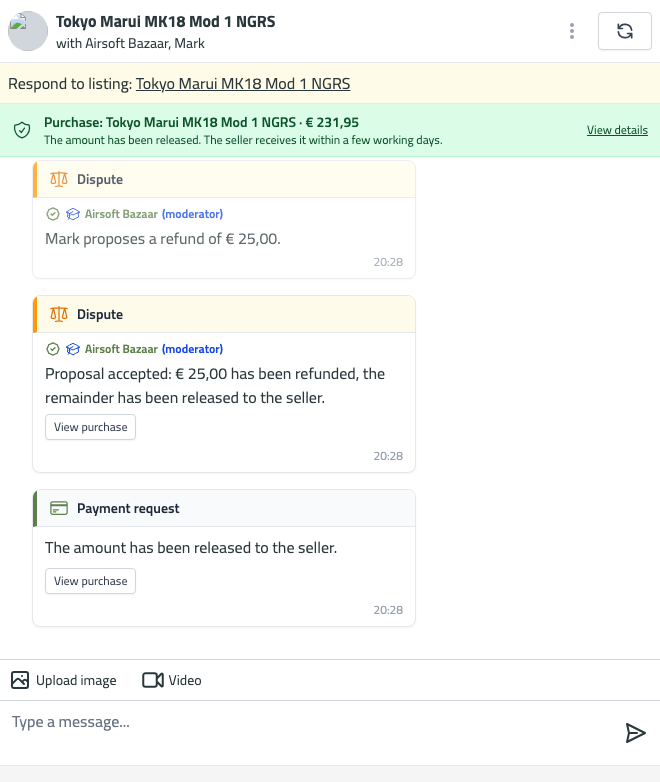
As soon as a proposal is accepted, the following happens automatically:
- The agreed amount is refunded to the buyer's payment method. Depending on your bank it usually takes 5 to 10 working days before you see it.
- The remaining amount is released to the seller immediately, who receives it in their account within a few working days.
- If the full amount has been refunded, the purchase is completed as "refunded".
Closing a dispute without a refund
Has the problem been solved after all, for example because the parcel was delivered anyway? Then the buyer clicks I have received the item in the purchase overview. The full amount is then released to the seller and the dispute is closed.
Frequently asked questions
Until when can I start a dispute?
Until the moment the amount is released automatically: 10 working days after payment. You can see the exact date in the chat and in the purchase overview. Has the parcel not arrived yet and is that date getting close? Start a dispute right away, for example with a proposal for a full refund. The release is then paused and you both keep the time to find out what happened.
Can the seller start a dispute?
No, only the buyer can start a dispute. After a rejected proposal, both parties can make a counter proposal.
Which costs do I get back?
The refund is at most the item price plus the shipping costs. The buyer protection and the service fee are not refunded.
What if the other party does not respond?
As long as the dispute is open, the money stays safely with Airsoft Bazaar; nothing is paid out. First send the other party a reminder in the chat. If there is still no response after several days, contact us via Request assistance in the purchase overview or via the chat at the bottom right of the website. Mention which listing it concerns and whether you are the buyer or the seller. We will then contact the other party and give them a deadline to respond. Read more in Guidelines for disputes with buyer protection.
Can Airsoft Bazaar decide who is right?
No. Airsoft Bazaar is not a party to the sale and does not judge who is right. We make sure the money is held safely until you agree, and only help when one of the two parties stops cooperating.
My parcel is missing, what now?
Read Missing package with buyer protection.
Tips
- Be specific: describe the problem and back it up with photos or a video in the chat.
- Respond quickly to proposals; both parties are waiting for the payout or refund.
- Stay polite. Threats or insults do not help and can lead to a ban.
- Keep all communication in the Airsoft Bazaar chat, so everything can be read back.