Before the buyer has paid
A payment request that has not been paid yet can be cancelled by both the buyer and the seller. Open the chat, click View details in the purchase bar and choose:
- Cancel payment request: the request is closed and the chat shows that it was cancelled. Nothing has been paid, so nothing has to be refunded.
- Decline (seller): a proposal the buyer made that you do not agree with. The buyer can then make a new proposal, or you create a payment request yourself with the correct amounts.
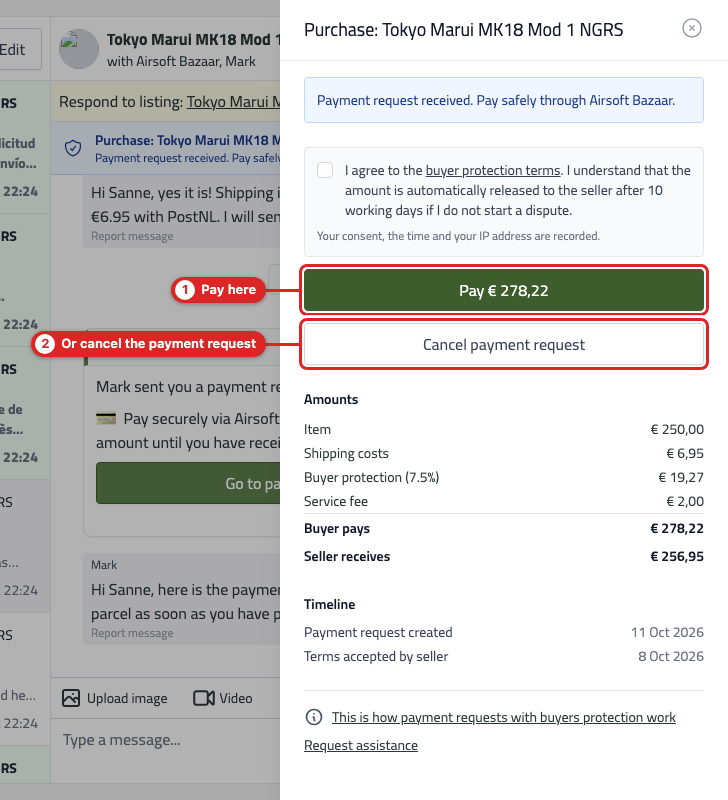
After cancelling you can simply create a new payment request in the same chat.
I made two proposals by mistake
Only the most recent payment request of a chat is active. Cancel the one you do not need via View details and Cancel payment request, and tell the other party in the chat which request remains. If you accidentally started a payment request in two different chats, cancel the extra one in the same way.
After the buyer has paid
A paid payment request can no longer be cancelled, because the money is already held safely by Airsoft Bazaar. You then have two options:
- Everything is fine: the buyer releases the amount with I have received the item, or it is released automatically 10 working days after payment.
- The purchase does not go ahead or something is wrong: the buyer starts a dispute via Start dispute and proposes a (full) refund. As soon as the seller accepts, the amount is refunded. Read How do disputes work in the chat?.
Please note: the buyer protection fee and the service fee are not refunded.
Good to know
- A chat with an active payment request cannot be deleted or archived. Cancel or complete the request first.
- A payment request is tied to a listing. Did the buyer choose a different item? Cancel the request and create a new one from the chat about that listing.
- If a payment got stuck in "processing", do not create a second request. Wait a few minutes or contact us via Request assistance in the purchase overview.